NPU 示例
NPU 工具链
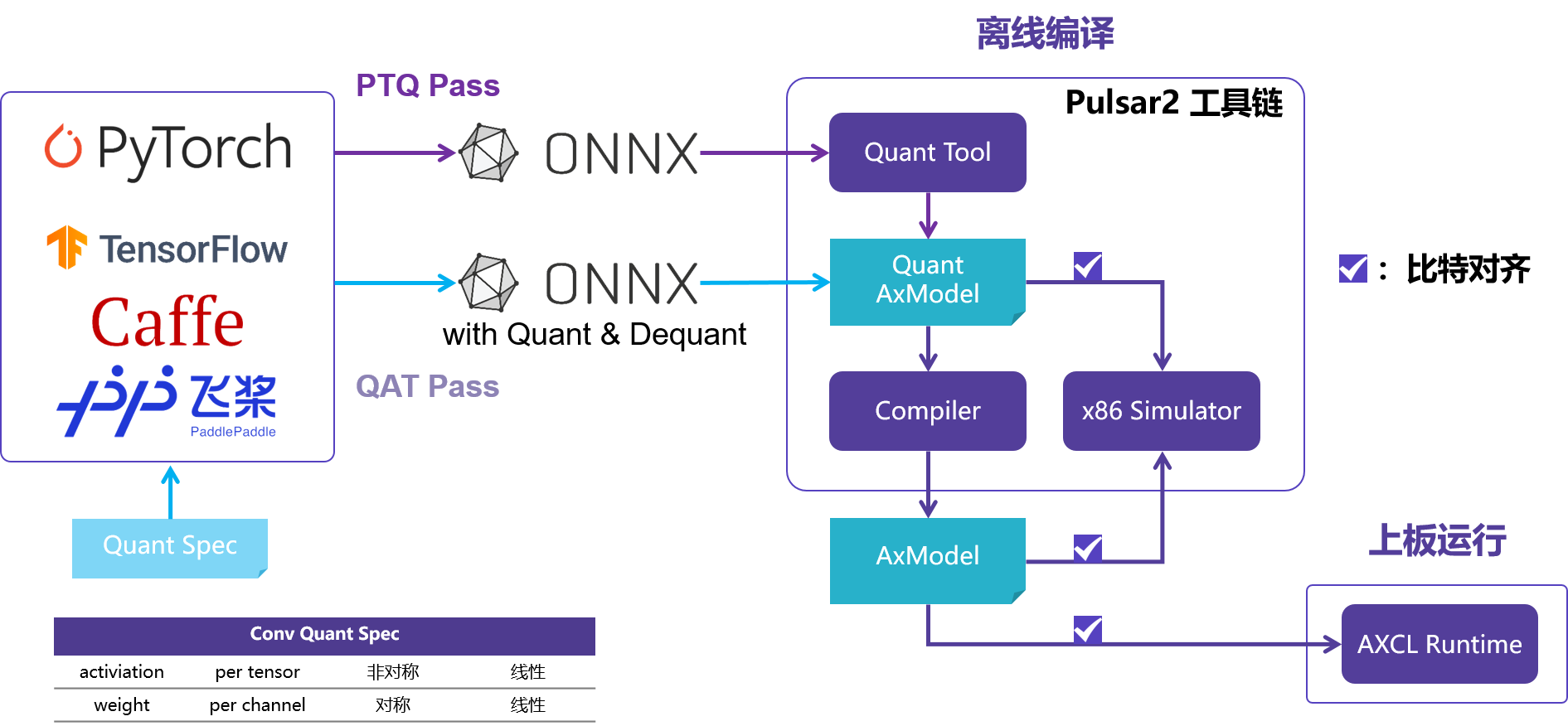
经常在 AI 芯片上部署算法模型的同学都知道,想要把模型部署到芯片上的 NPU 中运行,都需要使用芯片原厂提供的 NPU 工具链,这里我们使用的是 Pulsar2。
AXCL-Samples
AXCL-Samples 由 爱芯元智 主导开发。该项目实现了常见的深度学习开源算法在基于 爱芯元智 的 SoC 实现的 PCIE算力卡 产品上的运行的示例代码,方便社区开发者进行快速评估和适配。
该仓库采用最简单的方式展示常用的开源模型,例如 Ultralytics 的 YOLO 系列,DepthAnything,YOLO-Worldv2 等等。
获取示例
AXCL-Samples 的预编译 ModelZoo 请参考
YOLO11x
基于 Ultralytics YOLO11 系列模型详细的模型导出、量化、编译的流程请参考《基于 AX650N 部署 YOLO11》
(base) axera@raspberrypi:~/temp $ ./axcl_yolo11 -i ssd_horse.jpg -m yolo11x.axmodel
--------------------------------------
model file : yolo11x.axmodel
image file : ssd_horse.jpg
img_h, img_w : 640 640
--------------------------------------
post process cost time:1.44 ms
--------------------------------------
Repeat 1 times, avg time 24.69 ms, max_time 24.69 ms, min_time 24.69 ms
--------------------------------------
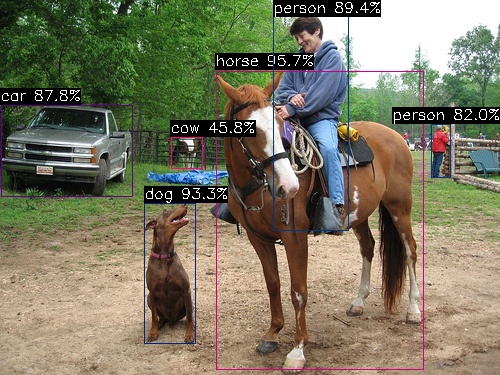
detection num: 6
17:  96%, [ 216,   71,  423,  370], horse
16:  93%, [ 144,  203,  196,  345], dog
 0:  89%, [ 273,   14,  349,  231], person
 2:  88%, [   1,  105,  132,  197], car
 0:  82%, [ 431,  124,  451,  178], person
19:  46%, [ 171,  137,  202,  169], cow
--------------------------------------
YOLO11x-Seg
(base) axera@raspberrypi:~/temp $ ./axcl_yolo11_seg -i ssd_horse.jpg -m yolo11x-seg.axmodel
--------------------------------------
model file : yolo11x-seg.axmodel
image file : ssd_horse.jpg
img_h, img_w : 640 640
--------------------------------------
post process cost time:3.12 ms
--------------------------------------
Repeat 1 times, avg time 34.75 ms, max_time 34.75 ms, min_time 34.75 ms
--------------------------------------
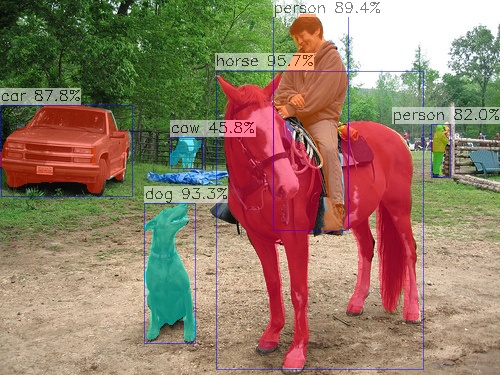
detection num: 6
17:  96%, [ 216,   71,  423,  370], horse
16:  93%, [ 144,  203,  196,  345], dog
 0:  89%, [ 273,   14,  349,  231], person
 2:  88%, [   1,  105,  132,  197], car
 0:  82%, [ 431,  124,  451,  178], person
19:  46%, [ 171,  137,  202,  169], cow
--------------------------------------
YOLO11x-Pose
axera@raspberrypi:~/temp $ ./axcl_yolo11_pose -i football.jpg -m yolo11x-pose.axmodel
--------------------------------------
model file : yolo11x-pose.axmodel
image file : football.jpg
img_h, img_w : 640 640
--------------------------------------
post process cost time:0.59 ms
--------------------------------------
Repeat 1 times, avg time 25.02 ms, max_time 25.02 ms, min_time 25.02 ms
--------------------------------------
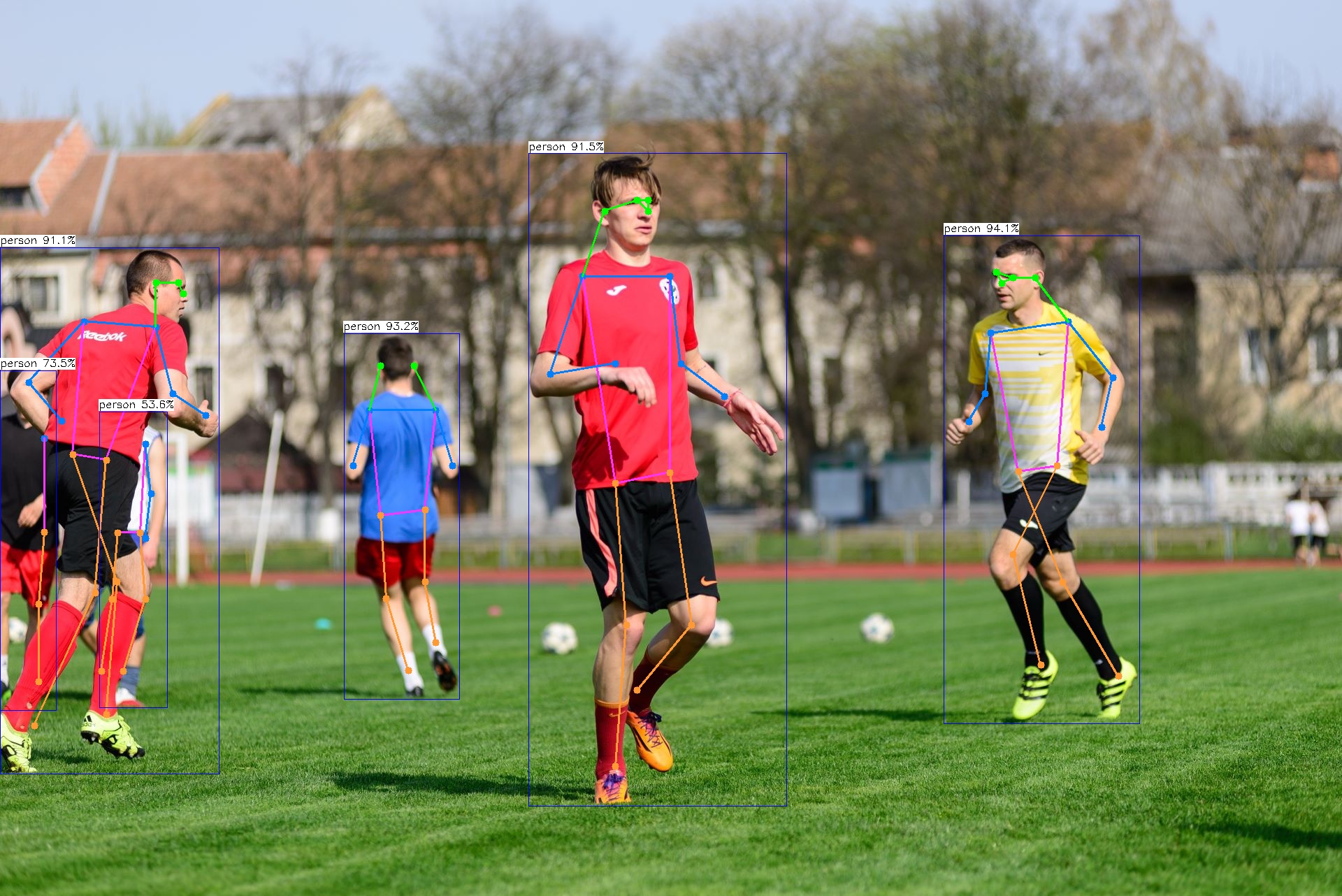
detection num: 6
 0:  94%, [1350,  337, 1632, 1036], person
 0:  93%, [ 492,  477,  658, 1000], person
 0:  92%, [ 756,  219, 1126, 1154], person
 0:  91%, [   0,  354,  314, 1108], person
 0:  73%, [   0,  530,   81, 1017], person
 0:  54%, [ 142,  589,  239, 1013], person
--------------------------------------
YOLO World v2
YOLO-Worldv2 该模型的详细模型导出、量化、编译的流程请参考《再谈 YOLO World 部署》
模型:yoloworldv2_4cls_50_npu3.axmodel
输入图片:ssd_horse.jpg
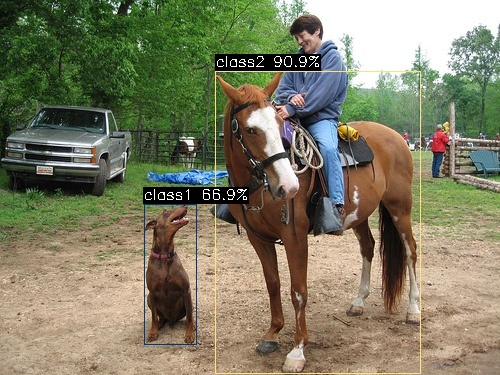
输入文本:dog.bin, 对应的 4 分类 ‘dog’ ‘horse’ ‘sheep’ ‘cow’
axera@raspberrypi:~/temp $ ./axcl_yolo_world_open_vocabulary -m yoloworldv2_4cls_50_npu3.axmodel -t dog.bin -i ssd_horse.jpg
--------------------------------------
model file : yoloworldv2_4cls_50_npu3.axmodel
image file : ssd_horse.jpg
text_feature file : dog.bin
img_h, img_w : 640 640
--------------------------------------
post process cost time:0.35 ms
--------------------------------------
Repeat 1 times, avg time 4.47 ms, max_time 4.47 ms, min_time 4.47 ms
--------------------------------------
detection num: 2
 1:  91%, [ 215,   71,  421,  374], class2
 0:  67%, [ 144,  204,  197,  346], class1
--------------------------------------
YOLOv7-Face
axera@raspberrypi:~/temp $ ./axcl_yolov7_face -m yolov7-face.axmodel -i selfie.jpg
--------------------------------------
model file : yolov7-face.axmodel
image file : selfie.jpg
img_h, img_w : 640 640
--------------------------------------
post process cost time:8.28 ms
--------------------------------------
Repeat 1 times, avg time 12.17 ms, max_time 12.17 ms, min_time 12.17 ms
--------------------------------------
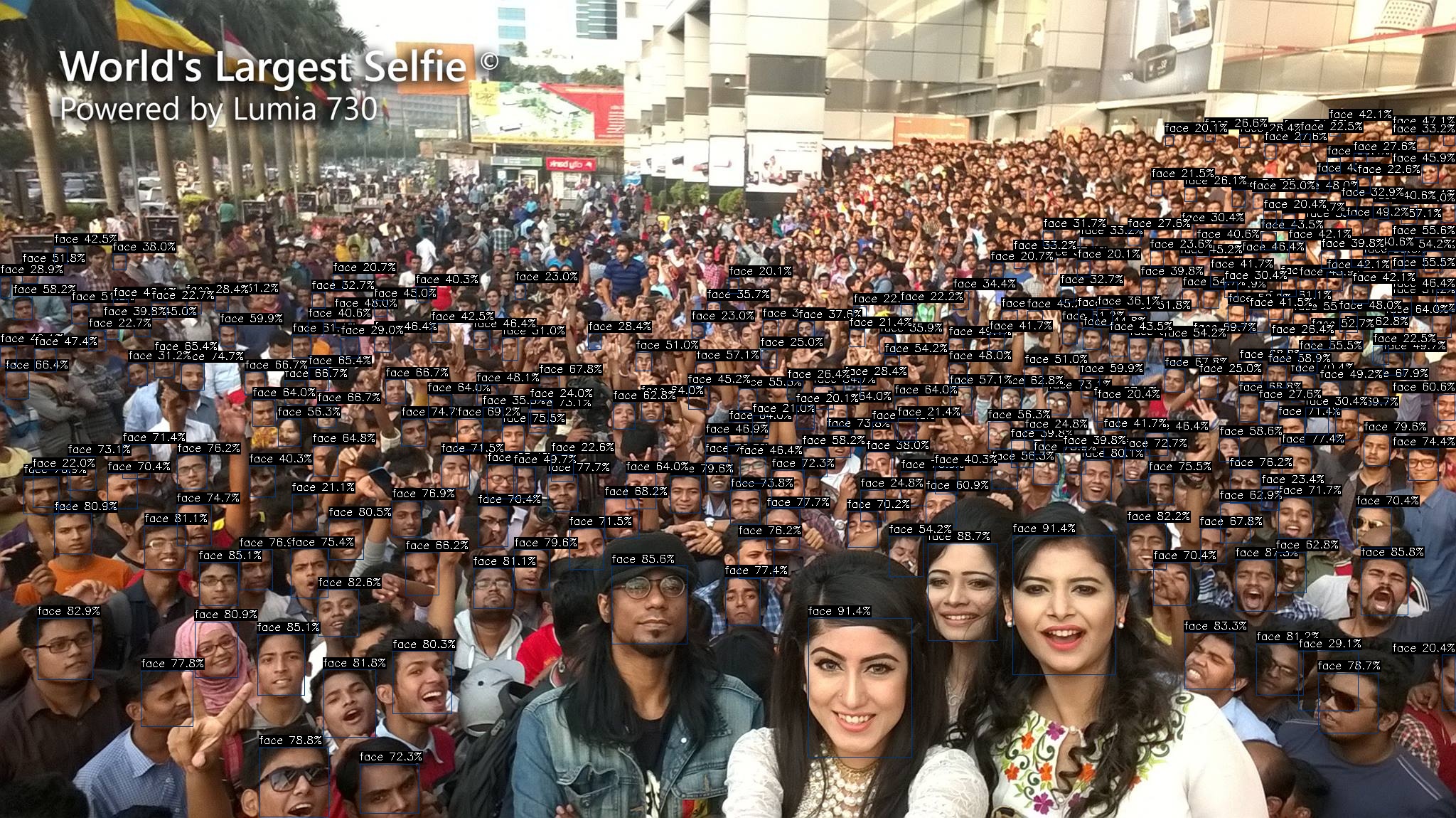
detection num: 277
 0:  91%, [1137,  869, 1283, 1065], face
 0:  91%, [1424,  753, 1570,  949], face
......
 0:  20%, [1120,  570, 1145,  604], face
 0:  20%, [1025,  390, 1041,  413], face
DepthAnything
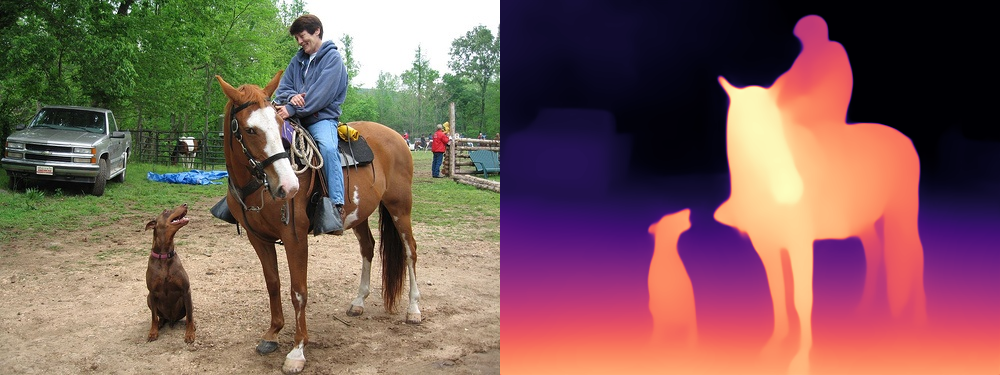
DepthAnything 该模型的详细模型导出、量化、编译的流程请参考《基于 AX650N 的 Depth Anything》
axera@raspberrypi:~/temp/axcl-samples/build $ ./install/bin/ax_depth_anything -m depth_anything.axmodel -i ssd_horse.jpg
--------------------------------------
model file : depth_anything.axmodel
image file : ssd_horse.jpg
img_h, img_w : 384 640
--------------------------------------
post process cost time:4.43 ms
--------------------------------------
Repeat 1 times, avg time 44.02 ms, max_time 44.02 ms, min_time 44.02 ms
--------------------------------------
LLM 示例
模型转请参考大模型编译文档
预编译 ModelZoo-LLM 请参考百度网盘
上板执行程序 main_pcie 请参考ax-llm pcie 分支
Tokenizer 解析器
tokenizer 解析准备
为了更方便、更准确的进行 LLM DEMO 展示,我们采用 transformers 内置的 tokenizer 解析服务,因此需要安装 python 环境和 transformers 库
安装 miniconda
wget https://repo.anaconda.com/miniconda/Miniconda3-latest-Linux-aarch64.sh
chmod a+x Miniconda3-latest-Linux-aarch64.sh
./Miniconda3-latest-Linux-aarch64.sh
启用 python 环境
conda create --name axcl python=3.9
conda activate axcl
安装 transformers
pip install transformers==4.41.1 -i https://mirrors.aliyun.com/pypi/simple
Qwen2.5
拷贝相关文件到 Host
文件说明
(base) axera@raspberrypi:~/qwen2.5-0.5b-prefill-ax650 $ tree
.
├── main_pcie_prefill
├── qwen2.5-0.5B-prefill-ax650
│   ├── model.embed_tokens.weight.bfloat16.bin
│   ├── qwen2_p128_l0_together.axmodel
│   ├── qwen2_p128_l10_together.axmodel
......
│   ├── qwen2_p128_l8_together.axmodel
│   ├── qwen2_p128_l9_together.axmodel
│   └── qwen2_post.axmodel
├── qwen2.5_tokenizer
│   ├── merges.txt
│   ├── tokenizer_config.json
│   ├── tokenizer.json
│   └── vocab.json
├── qwen2.5_tokenizer.py
└── run_qwen2.5_0.5B_prefill_pcie.sh
启动 tokenizer 解析器
运行 tokenizer 服务,Host ip 默认为 localhost,端口号设置为 12345,正在运行后信息如下
(axcl) axera@raspberrypi:~/qwen2.5-0.5b-prefill-ax650 $ python qwen2.5_tokenizer.py --port 12345
None of PyTorch, TensorFlow >= 2.0, or Flax have been found. Models won't be available and only tokenizers, configuration and file/data utilities can be used.
Special tokens have been added in the vocabulary, make sure the associated word embeddings are fine-tuned or trained.
None None 151645 <|im_end|>
<|im_start|>system
You are Qwen, created by Alibaba Cloud. You are a helpful assistant.<|im_end|>
<|im_start|>user
hello world<|im_end|>
<|im_start|>assistant

[151644, 8948, 198, 2610, 525, 1207, 16948, 11, 3465, 553, 54364, 14817, 13, 1446, 525, 264, 10950, 17847, 13, 151645, 198, 151644, 872, 198, 14990, 1879, 151645, 198, 151644, 77091, 198]
http://localhost:12345
运行 Qwen 2.5
(base) axera@raspberrypi:~/qtang/llama_axera_cpp $ ./run_qwen2_0.5B_prefill_pcie.sh
[I][                            Init][ 129]: LLM init start
  7% | ███                               |   2 /  27 [1.30s<17.54s, 1.54 count/s] embed_selector init okcat: /proc/ax_proc/mem_cmm_info: No such file or directory
 11% | ████                              |   3 /  27 [1.75s<15.74s, 1.72 count/s] init 0 axmodel ok,remain_cmm(-1 MB)cat: /proc/ax_proc/mem_cmm_info: No such file or directory
......
 96% | ███████████████████████████████   |  26 /  27 [7.34s<7.62s, 3.54 count/s] init 23 axmodel ok,remain_cmm(-1 MB)cat: /proc/ax_proc/mem_cmm_info: No such file or directory
100% | ████████████████████████████████ |  27 /  27 [12.84s<12.84s, 2.10 count/s] init post axmodel ok,remain_cmm(-1 MB)
[I][                            Init][ 253]: max_token_len : 1023
[I][                            Init][ 258]: kv_cache_size : 128, kv_cache_num: 1023
[I][                            Init][ 266]: prefill_token_num : 128
[I][                            Init][ 348]: LLM init ok
Type "q" to exit, Ctrl+c to stop current running
>> 你是谁?
[I][                             Run][ 511]: ttft: 128.70 ms
我是来自阿里云的大规模语言模型,我叫通义千问。
[N][                             Run][ 636]: hit eos,avg 26.44 token/s

>> 深圳在哪里?
[I][                             Run][ 511]: ttft: 128.96 ms
深圳位于中国广东省,是中国的经济中心之一。
[N][                             Run][ 636]: hit eos,avg 25.89 token/s

>> q
InternVL2-1B
InternVL2-1B 的详细模型导出、量化、编译的流程请参考《基于 AX650N/AX630C 部署多模态大模型 InternVL2-1B》
拷贝相关文件到 Host
文件说明
(axcl) axera@raspberrypi:~/internvl2-1b-448-ax650 $ tree
.
├── internvl2_tokenizer
│   ├── added_tokens.json
│   ├── merges.txt
│   ├── special_tokens_map.json
│   ├── tokenizer_config.json
│   └── vocab.json
├── internvl2_tokenizer_448.py
├── internvl_448
│   ├── intervl_vision_part_448.axmodel
│   ├── model.embed_tokens.weight.bfloat16.bin
│   ├── qwen2_p320_l0_together.axmodel
......
│   ├── qwen2_p320_l9_together.axmodel
│   └── qwen2_post.axmodel
├── main_internvl
├── main_internvl_pcie
├── run_internvl2_448_ax650.sh
└── run_internvl2_448_pcie.sh
启动 tokenizer 解析器
运行 tokenizer 服务,Host ip 默认为 localhost,端口号设置为 12345,正在运行后信息如下
(axcl_test) axera@raspberrypi:~/internvl2-1b-448-ax650 $ python internvl2_tokenizer_448.py --port 12345
None of PyTorch, TensorFlow >= 2.0, or Flax have been found. Models won't be available and only tokenizers, configuration and file/data utilities can be used.
Special tokens have been added in the vocabulary, make sure the associated word embeddings are fine-tuned or trained.
None None 151645 <|im_end|>
[151644, 8948, 198, 56568, 104625, 100633, 104455, 104800, 101101, 32022, ...... 5501, 7512, 279, 2168, 19620, 13, 151645, 151644, 77091, 198]
310
[151644, 8948, 198, 56568, 104625, 100633, 104455, 104800, 101101, 32022, ......151645, 151644, 77091, 198]
http://localhost:12345
运行 InternVL2-1B
测试图片

输出信息
(base) axera@raspberrypi:~/internvl2-1b-448-ax650 $ ./run_internvl2_448_pcie.sh
[I][                            Init][ 135]: LLM init start
bos_id: -1, eos_id: 151645
  7% | ███                               |   2 /  27 [0.95s<12.82s, 2.11 count/s] embed_selector init okcat: /proc/ax_proc/mem_cmm_info: No such file or directory
 11% | ████                              |   3 /  27 [1.40s<12.61s, 2.14 count/s] init 0 axmodel ok,remain_cmm(-1 MB)cat: /proc/ax_proc/mem_cmm_info: No such file or directory
......
100% | ████████████████████████████████ |  27 /  27 [8.99s<8.99s, 3.00 count/s] init post axmodel ok,remain_cmm(-1 MB)
[I][                            Init][ 292]: max_token_len : 1023
[I][                            Init][ 297]: kv_cache_size : 128, kv_cache_num: 1023
[I][                            Init][ 305]: prefill_token_num : 320
[I][                            Init][ 307]: vpm_height : 448,vpm_width : 448
[I][                            Init][ 389]: LLM init ok
Type "q" to exit, Ctrl+c to stop current running
prompt >> who are you?
image >>
[I][                             Run][ 626]: ttft: 425.78 ms
I am an AI assistant whose name is InternVL, developed jointly by Shanghai AI Lab and SenseTime.
[N][                             Run][ 751]: hit eos,avg 29.24 token/s

prompt >> 图片中有什么?
image >> ./ssd_car.jpg
[I][                          Encode][ 468]: image encode time : 4202.367188 ms, size : 229376
[I][                             Run][ 626]: ttft: 425.97 ms
这张图片展示了一辆红色的双层巴士,巴士上有一个广告,广告上写着“THINGS GET MORE EXCITING WHEN YOU SAY YES”(当你说“是”时,事情会变得更加有趣)。巴士停在城市街道的一侧,街道两旁有建筑物和行人。图片中还有一位穿着黑色外套的女士站在巴士前微笑。
[N][                             Run][ 751]: hit eos,avg 29.26 token/s

prompt >> q
(base) axera@raspberrypi:~/internvl2-1b-448-ax650 $
音频大模型
本章节展示常用的 ASR(自动语音识别)、TTS(文本转语音)模型示例。
Whisper
本小节只指导如何在 Raspberry Pi 5 上运行预编译好的基于 Whipser Small 的语音转文字示例;
模型转换、示例源码编译请参考 whisper.axcl。
下载
git clone https://github.com/ml-inory/whisper.axcl.git
预编译模型
预编译模型下载(百度网盘)
下载后放到 models 下
编译
cd whisper.axcl
mkdir -p build && cd build
cmake -DCMAKE_INSTALL_PREFIX=../install -DCMAKE_BUILD_TYPE=Release ..
make install -j4
运行 Whisper
cd install
./whisper -w ../demo.wav
运行结果
(base) axera@raspberrypi:~/qtang/whisper.axcl/install $ ./whisper -w ../demo.wav
encoder: ../models/small-encoder.axmodel
decoder_main: ../models/small-decoder-main.axmodel
decoder_loop: ../models/small-decoder-loop.axmodel
wav_file: ../demo.wav
language: zh
Load encoder take 3336.25 ms
Load decoder_main take 6091.89 ms
Load decoder_loop take 5690.05 ms
Read positional_embedding
Encoder run take 190.26 ms
First token: 17556       take 51.49ms
Next Token: 20844        take 30.15 ms
Next Token: 7781         take 30.21 ms
Next Token: 20204        take 30.20 ms
Next Token: 28455        take 30.17 ms
Next Token: 31962        take 30.02 ms
Next Token: 6336         take 30.09 ms
Next Token: 254          take 30.22 ms
Next Token: 2930         take 30.14 ms
Next Token: 236          take 30.14 ms
Next Token: 36135        take 30.12 ms
Next Token: 15868        take 30.18 ms
Next Token: 252          take 30.01 ms
Next Token: 1546         take 30.17 ms
Next Token: 46514        take 30.17 ms
Next Token: 50257        take 30.15 ms
All Token: take 503.68ms, 31.77 token/s
All take 735.09ms
Result: 甚至出现交易几乎停滞的情况
(base) axera@raspberrypi:~/qtang/whisper.axcl/install $
MeloTTS
本小节只指导如何在 Raspberry Pi 5 上运行预编译好的 MeloTTS 文字转语音示例;
模型转换、示例源码编译请参考 melotts.axcl。
下载
git clone https://github.com/ml-inory/melotts.axcl.git
预编译模型
cd melotts.axcl
./download_models.sh
编译
x86_64 平台
./build.sh
aarch64 平台
./build_aarch64.sh
运行 MeloTTS 在 melotts.axcl 项目根目录下运行
./install/melotts -s 句子
运行结果
(base) axera@raspberrypi:~/melotts.axcl $ ./install/melotts
encoder: ./models/encoder.onnx
decoder: ./models/decoder.axmodel
lexicon: ./models/lexicon.txt
token: ./models/tokens.txt
sentence: 爱芯元智半导体股份有限公司,致力于打造世界领先的人工智能感知与边缘计算芯片。服务智慧城市、智能驾驶、机器人的海量普惠的应用
wav: output.wav
speed: 0.800000
sample_rate: 44100
Load encoder
Load decoder model
Encoder run take 191.25ms
decoder slice num: 9
Decode slice(1/9) take 39.90ms
Decode slice(2/9) take 39.66ms
Decode slice(3/9) take 39.98ms
Decode slice(4/9) take 39.57ms
Decode slice(5/9) take 40.28ms
Decode slice(6/9) take 39.68ms
Decode slice(7/9) take 39.59ms
Decode slice(8/9) take 39.58ms
Decode slice(9/9) take 41.11ms
Saved audio to output.wav
(base) axera@raspberrypi:~/melotts.axcl $